 CoinTrendzBot
X (Twitter) Post Alerts for Discord
Build a live Discord feed from tracked X accounts across crypto, AI, stocks, world news, government, policy, KOLs, and more.
Create a focused X feed inside Discord
Bring selected sources into a shared server channel so members can react to primary posts without everyone maintaining the same external watchlist.
Browse useful categories
Explore tracked accounts across crypto, AI, stocks, news, government, policy, KOLs, and other topics.
Subscribe a server channel
Choose a profile and route newly detected activity to the current Discord destination.
Decide what belongs
Original posts stay included while replies, quote posts, and reposts can be toggled.
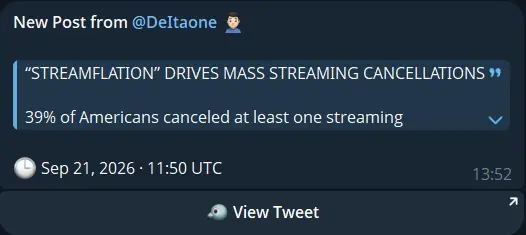
Receive posts automatically
CoinTrendzBot continuously monitors the subscription and forwards new activity when detected.
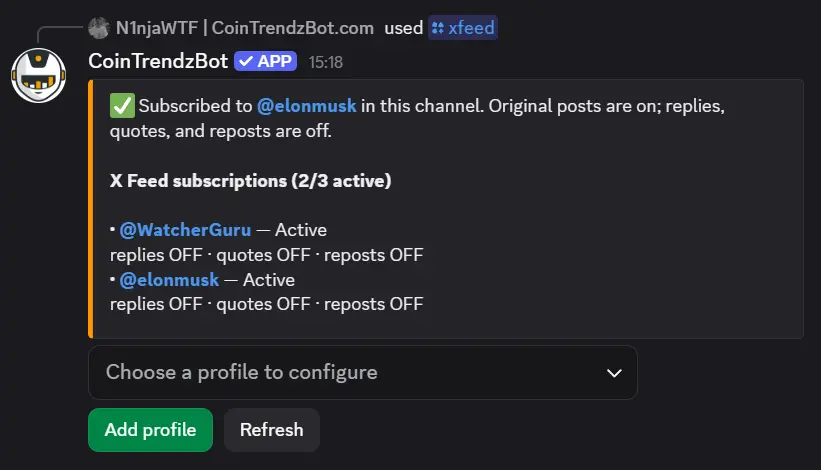
Discord /xfeed slash command
Browse the tracked profile directory or provide an available username in the profile option.
/xfeed profile:[@trackedprofile]
Build a Discord X feed in three steps
Set it up from the channel where your members should see the posts.
Invite CoinTrendzBot
Add the bot and open the Discord channel that should become your X feed.
Run /xfeed
Browse the categories, select a tracked account, and confirm the subscription.
Tune the signal
Choose whether replies, quote posts, and reposts should accompany the original posts.
Give your Discord community a shared source feed
A dedicated X channel can surface a breaking headline, policy statement, founder comment, or market update before it disappears into the wider timeline.
- Profiles across major topics
- Automatic new-post delivery
- Optional replies, quotes, and reposts
- Admin-managed server settings
- One active profile on Free
Follow one tracked X profile for free
The free Discord bot includes one active X profile per destination. CoinTrendz Pro raises the limit to three profiles.
Questions, ideas, or profiles worth tracking?
Join the CoinTrendz community
Meet other users, compare information sources, and discuss future CoinTrendzBot features.

Prefer a different platform?
Explore the other X feed versions
Discord X feed questions
Build a smarter Discord feed