 CoinTrendzBot
YouTube Upload Notifications for Discord
Turn a Discord channel into an automatic video feed and keep your server informed whenever a YouTube creator publishes something new.
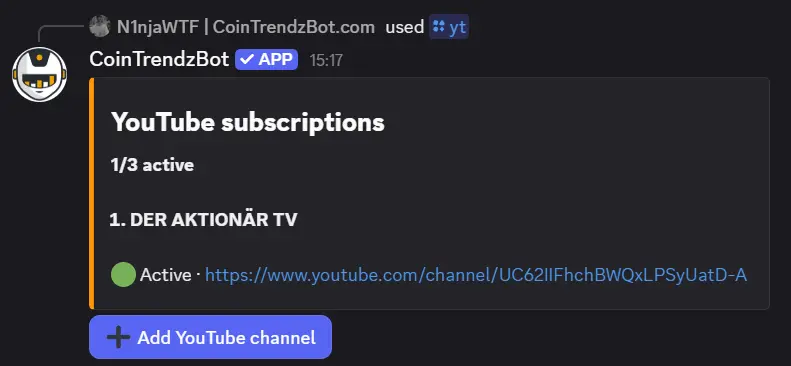
Give your Discord server a reliable YouTube feed
Configure the subscription once and CoinTrendzBot watches the selected channel in the background, giving members one shared place to find each new upload.
Add any public channel
Use its YouTube @handle, full channel URL, or UC channel ID.
Choose the right Discord channel
Keep research, news, education, or creator uploads in a dedicated server destination.
Notify the server automatically
CoinTrendzBot posts when it detects a newly published video.
Manage it with /yt
Review, remove, or replace subscriptions through the Discord command controls.
Discord /yt slash command
Open the setup panel or pass a YouTube handle, channel URL, or UC channel ID in the channel option.
/yt channel:[@handle | channel URL | channel ID]
Create a Discord YouTube feed in three steps
No separate dashboard or member-by-member YouTube setup is required.
Invite CoinTrendzBot
Add the bot to your server and make sure it can post in the destination channel.
Run /yt
Select or paste the YouTube channel you want the server to monitor.
Wait for the next upload
When CoinTrendzBot detects a new video, it posts the notification automatically.
New videos become part of the Discord conversation
A shared upload feed works for trading servers, creator communities, project teams, educators, podcasts, and news-focused channels.
- Any public YouTube channel
- Automatic upload notifications
- Dedicated Discord channel delivery
- Admin-managed subscriptions
- One active channel on Free

Monitor one YouTube channel for free
The free Discord bot supports one active YouTube subscription per destination. CoinTrendz Pro increases the limit to three.
Questions, ideas, or channels worth following?
Join the CoinTrendz community
Meet other users, compare alert setups, and discuss new CoinTrendzBot features.

Prefer a different platform?
Explore the other YouTube alert versions
Discord YouTube notification questions
Keep your Discord server up to date