 CoinTrendzBot
X (Twitter) Post Alerts for Telegram
Create a focused Telegram feed from tracked X accounts across crypto, AI, stocks, world news, government, policy, KOLs, and more.
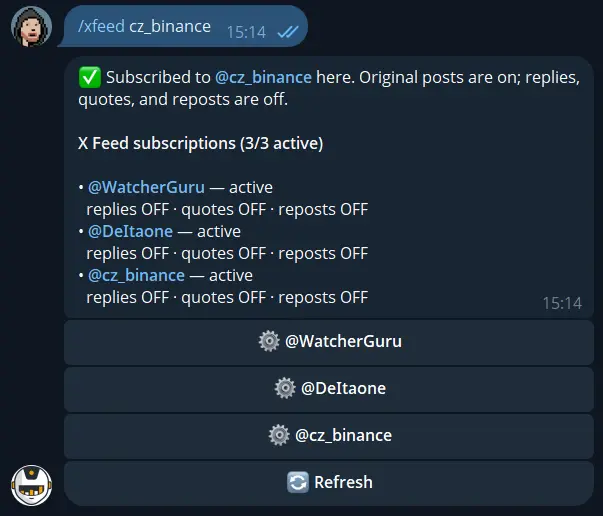
Turn a Telegram chat into a focused X feed
Instead of making every member scan the same noisy timeline, subscribe the destination once and bring selected voices into the conversation automatically.
Browse by topic
Explore tracked profiles covering crypto, artificial intelligence, stocks, news, government, policy, KOLs, and more.
Select a useful voice
Choose a profile from the directory and subscribe the current Telegram destination.
Control the noise
Keep original posts and decide whether replies, quote posts, and reposts should also appear.
Get new posts automatically
CoinTrendzBot monitors the profile and sends new activity as it is detected.
Telegram /xfeed command syntax
Open the category browser with /xfeed, or add a username directly when that profile is available in the tracked directory.
/xfeed [@trackedprofile]
Build your Telegram X feed in three steps
Configure it from the exact chat or topic that should receive the posts.
Choose the destination
Open a CoinTrendzBot DM, Telegram group, or forum topic and send /xfeed.
Pick a tracked profile
Browse the topic categories, choose an account, and confirm the subscription.
Tune the feed
Enable or disable replies, quote posts, and reposts to match the signal level your chat needs.
Important X posts, shared with the whole Telegram group
A common feed helps communities react to the same primary source, from a policy announcement or market comment to a breaking industry update.
- Profiles across major topics
- Automatic new-post delivery
- Optional replies, quotes, and reposts
- Telegram topic support
- One active profile on Free

Follow one tracked X profile for free
The free Telegram bot includes one active X profile per destination. CoinTrendz Pro raises the limit to three profiles.
Questions, ideas, or profiles worth tracking?
Join the CoinTrendz community
Meet other users, compare information sources, and discuss future CoinTrendzBot features.

Telegram X feed questions
Build a smarter Telegram feed