 CoinTrendzBot
Schedule Crypto Commands on Discord
Turn supported slash commands into automatic market updates for your Discord channel.
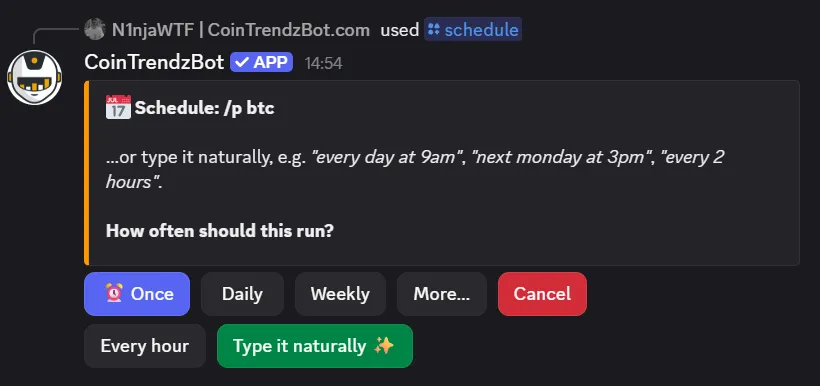
How Scheduled Crypto Commands works on Discord
Start with the command you want to automate, choose when it should run, confirm the schedule, and manage future executions from the schedule list.
Choose a supported command
Enter the CoinTrendzBot command and arguments you want to run automatically.
Choose a schedule
Create a one-time run or repeat it at an interval, daily, weekly, or monthly.
Manage every schedule
Review upcoming runs and pause, resume, edit, or delete schedules from interactive controls.
Post automatically
CoinTrendzBot executes the command and sends its result to the configured destination.
Discord command syntax
Open the schedule manager or pass a supported command and its arguments to begin the setup wizard.
/schedule [command]
How to use Scheduled Crypto Commands on Discord
Get the result directly in chat in a few simple steps.
Activate CoinTrendz Pro
Make sure your account or server has active Pro access.
Run the command
Enter /schedule and submit the command.
Review the result
Confirm the frequency and destination, then manage the schedule from the interactive list.
Automated market updates for active communities
Post regular price checks, charts, and other supported results without asking a moderator to run them manually.
- One-time and recurring schedules
- Natural-language schedule setup
- Interactive pause, resume, edit, and delete controls
- Destination-aware admin permissions
- Automatic command delivery
Unlock Scheduled Crypto Commands with CoinTrendz Pro
The /schedule automation command is available with CoinTrendz Pro and supports a configurable number of active schedules.
Need help or want to meet other traders?
Join the CoinTrendz community
Discuss crypto markets, bot commands, and new CoinTrendzBot features with other users.

Looking for another version?
Explore more ways to use this feature
Frequently asked questions
Explore more CoinTrendzBot commands