 CoinTrendzBot
CoinTrendzBot Discord Settings
Customize your CoinTrendzBot experience on Discord. Configure preferences and control how the bot behaves across your servers & channels.
See how it works!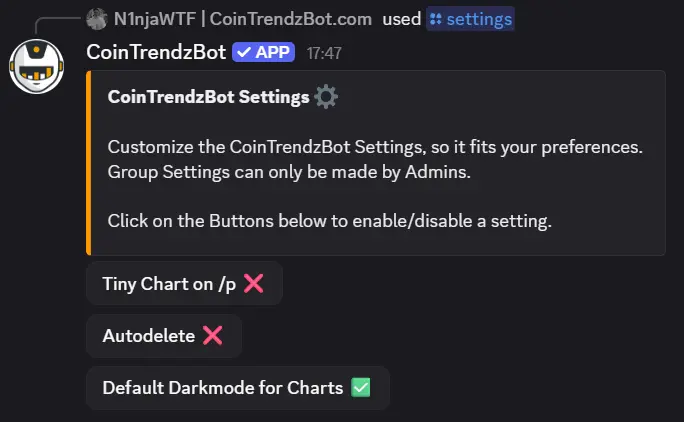
CoinTrendzBot Settings on Discord Explained
Use the /settings slash command in your Discord server to configure CoinTrendzBot. Only server admins or users with permissions can change settings, and they apply to the entire server.
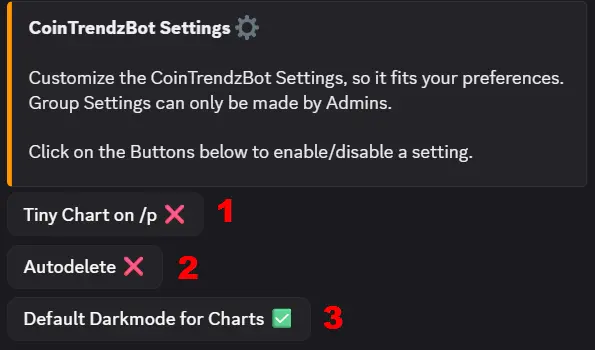
1. Tiny Chart on /p
Display a small sparkline chart on the /p command to quickly see recent price action.
2. Auto Cleanup
Automatically delete bot responses after a short time to keep your channels clean.
3. Default Dark Mode Charts
Set charts to dark mode by default for better readability.
Start Customzing Your Crypto Bot Experience
Get Started with CoinTrendzBot!
Discord Bot Setup Guide Chat with the Bot!Questions?
Join our Discord Support Group below, if you have any open questions, feedback or suggestions!