 CoinTrendzBot
How to Install CoinTrendzBot on Discord!
Step by Step Tutorial how to install CoinTrendzBot on Discord and use it in your Group
Use on a Discord Server
1 Download Discord
Discord is required to use CoinTrendzBot on servers. You can install it on Desktop, iPhone, Android or use it in the Browser. Download it here. Skip this step if you already have Discord.
2 Invite CoinTrendzBot
Make sure you are logged into Discord, then visit the CoinTrendzBot Discord Page and click "Add App" and then "Add to Server". Alternatively, you can also chat with CoinTrendzBot on Discord and type the command /howtoadd.
3 Choose Your Server
Select the Discord server where you want to install CoinTrendzBot. You must have Administrator or Manage Server permissions.
4 Grant Permissions
Review and approve the requested permissions. Once added, CoinTrendzBot is ready to use 🎉 Try typing /price btc or /help in any channel.
Use in Personal Chat (DM)
1 Download Discord
Install Discord on Desktop or Mobile, or use it in the browser. Download it here.
2 Open CoinTrendzBot
Visit the CoinTrendzBot Discord Page and start a chat (DM).
3 Run Commands in DM
You can now use CoinTrendzBot directly in DM 🎉 Try /help or /price btc.
Quick Start Tips (Discord)
- Use /help to list all commands
- Use slash commands like /p for price info
- Check command options directly inside Discord when typing a slash command like /c
- Add the Bot to a Group by typing /howtoadd
- Remove Ads and get access to Pro-Features, by typing /pro
Check out our Features Page for all Commands or have a look at the CoinTrendzBot Cheatsheet below for a quick overview of all Bot functionalities.
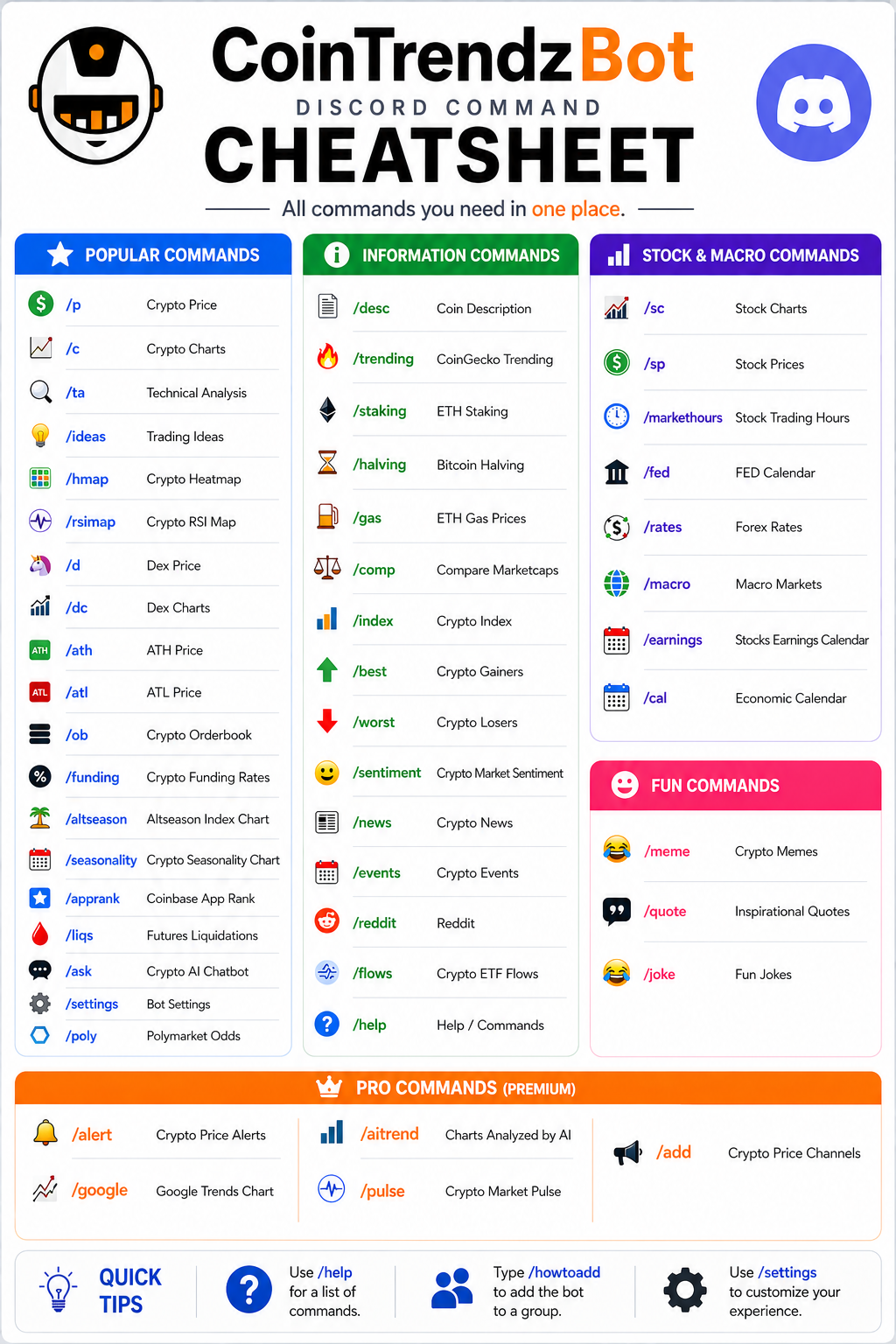
How to install CoinTrendzBot on Discord
 CoinTrendzBot Discord Installation
Need Assistance?
If something is still unclear and you need any assistance, don't hesitate to contact us in our Discord Crypto Group, we are here for you.