 CoinTrendzBot
Telegram DEX Trades Tracker
Analyze the latest pool trades and see whether buyers or sellers control recent on-chain activity.
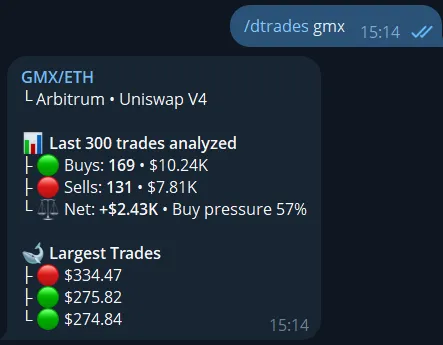
How DEX Trades Tracker works on Telegram
Enter a ticker, token address, or pool address. CoinTrendzBot resolves the most relevant pool and summarizes the recent trades currently available for that market.
Resolve the right pool
Search by ticker or use an exact contract or pool address when you already know the market.
Count buys and sells
See whole-number order counts and the analyzed trade total without unnecessary decimal places.
Measure order flow
Compare buy volume, sell volume, net flow, and the dominant side of recent trading.
Spot the largest swaps
Review the biggest recent trades to identify unusually large on-chain activity.
Telegram command syntax
Enter a ticker, token contract, or pool address and optionally specify the blockchain.
/dtrades <symbol|token|pool> [blockchain]
How to use DEX Trades Tracker on Telegram
Get the result directly in chat in a few simple steps.
Open CoinTrendzBot
Open the bot or add it to the chat where you want the result.
Run the command
Enter /dtrades gmx and submit the command.
Review the result
Review order counts, volume, net flow, pressure, and the largest trades in the resolved pool.
Clear DEX order flow for every chat
Share a readable snapshot of recent pool activity instead of posting raw trade feeds.
- Recent buy and sell counts
- Buy volume versus sell volume
- Net order flow and dominant pressure
- Largest DEX swaps
- Automatic best-pool resolution
Use this command for free
The /dtrades command is available for free on Telegram and Discord.
Need help or want to meet other traders?
Join the CoinTrendz community
Discuss crypto markets, bot commands, and new CoinTrendzBot features with other users.

Looking for another version?
Explore more ways to use this feature
Frequently asked questions
Explore more CoinTrendzBot commands