 CoinTrendzBot
Telegram Crypto Volume Bot
Track DEX trading volume, liquidity activity, and token momentum directly inside Telegram chats and groups.
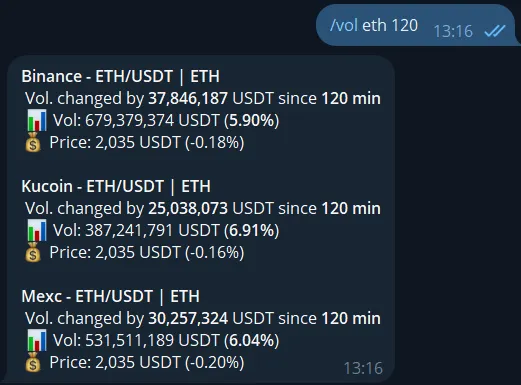
How to track DEX volume on Telegram
The /vol command lets you instantly access DEX trading volume and liquidity activity directly within Telegram. Monitor token momentum, detect unusual spikes, and analyze market activity without leaving your chat. It’s built for traders, on-chain analysts, and crypto communities that rely on fast volume insights.
Live volume data
Track real-time DEX trading volume directly inside Telegram chats.
Spot momentum
Identify tokens gaining traction through sudden volume spikes and activity.
Built for groups
Use the command in Telegram groups to analyze volume trends together.
Fast command flow
Use a simple command like /vol eth and get volume insights instantly.
Telegram command syntax
Use the command below inside Telegram to check DEX trading volume and token activity.
/vol <symbol>
How to use /vol command on Telegram
Start tracking crypto volume in just a few steps.
Start the bot
Open CoinTrendzBot on Telegram and start a private chat.
Add it to your group
Invite the bot to your Telegram group to track volume together.
Run the command
Type /vol followed by a token symbol to instantly view trading volume data.
Perfect for Telegram groups
CoinTrendzBot helps groups track token volume, detect market activity, and react to momentum shifts in real time without leaving Telegram.
- Track trading volume together in real time
- Great for alpha groups, traders, and on-chain analysts
- Helps identify trending tokens early
- Improves discussion around liquidity and market activity
- Reduces reliance on external dashboards and tools
Use this Telegram crypto volume bot for free
Track DEX trading volume and token activity directly inside Telegram without a paid upgrade.
Need help or want to connect with other users?
Join the CoinTrendz community
Join our Telegram community group to discuss volume trends, trading strategies, and bot usage.

Using a different platform?
See the other versions of this feature
Frequently asked questions
Explore more CoinTrendzBot Commands