 CoinTrendzBot
Telegram Crypto Portfolio Bot
Create your own crypto portfolio list on Telegram and quickly check how your selected coins are performing in one place.
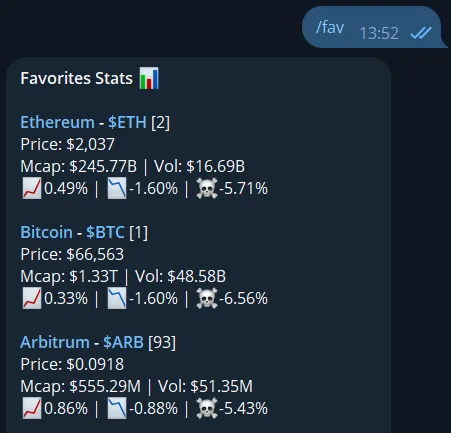
How to track a crypto portfolio on Telegram
The /fav command lets you create and manage a personal crypto portfolio list directly in your Telegram chat or group. Once your list is set up, you can quickly check price performance, compare coins, and follow your selected assets with one simple command.
Build your portfolio list
Add coins you want to follow and create a personalized crypto portfolio directly inside Telegram.
Track performance fast
Get a quick overview of how your selected portfolio coins are performing without typing multiple separate commands.
See everything in one view
Review your tracked cryptocurrencies together in a single aggregated portfolio summary.
Works in groups
Use the portfolio command in Telegram groups or personal chats to keep your crypto watchlist organized.
Telegram command syntax
Use the command below inside Telegram to create or manage your crypto portfolio list.
How to use /fav command on Telegram
Start tracking your crypto portfolio in just a few steps.
Start the bot
Open CoinTrendzBot on Telegram and begin a personal chat or add it to a group.
Add portfolio coins
Type a command like /fav btc or /fav eth to add coins you want to track in your portfolio list.
Check your overview
Use /fav without extra parameters to view the performance of all coins currently saved in your portfolio.
Perfect for Telegram trading groups
Create a shared crypto portfolio list inside Telegram groups so members can quickly monitor selected coins together.
- Create a crypto portfolio list directly in your Telegram group
- Track Bitcoin, Ethereum, and altcoins in one shared overview
- See portfolio performance without typing multiple coin commands
- Keep community watchlists organized in a simple format
- Save time when checking selected coins throughout the day
Unlock crypto portfolio tracking with CoinTrendz Pro
The crypto portfolio command is available to Pro users and lets you create a personalized coin list to monitor selected assets directly inside Telegram.
Need help or want to connect with other users?
Join the CoinTrendz community
Join our Telegram community group if you have questions, want feedback, or want to connect with other CoinTrendzBot users and crypto traders.

Using a different platform?
See the other versions of this feature
Frequently asked questions
Explore more CoinTrendzBot Commands