 CoinTrendzBot
Telegram Crypto Open Interest Bot
Monitor total open interest, historical changes, and exchange-level positioning for the coin you choose.
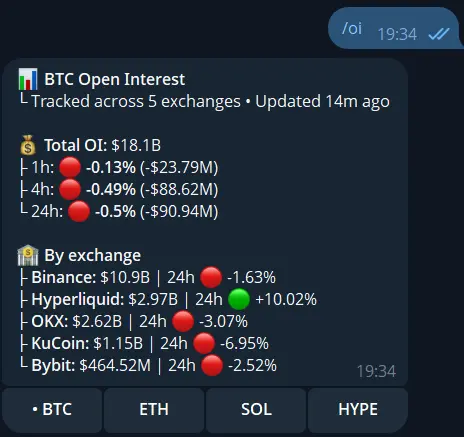
How Crypto Open Interest works on Telegram
Enter a coin ticker such as BTC, ETH, SOL, or HYPE. CoinTrendzBot loads the latest fresh snapshots, totals the tracked exchanges, and compares them with historical snapshots.
Select a coin
Request open interest for the underlying asset you want to analyze instead of a single fixed market total.
Compare historical changes
See how total OI changed over 1 hour, 4 hours, and 24 hours in both percentage and USD terms.
Compare exchanges
Review current open interest and the available 24-hour change for each tracked exchange.
Check data freshness
The result shows how recently the underlying snapshots were updated and rejects stale data.
Telegram command syntax
Enter a base asset ticker or run the command without one to use BTC.
How to use Crypto Open Interest on Telegram
Get the result directly in chat in a few simple steps.
Open CoinTrendzBot
Open the bot or add it to the chat where you want the result.
Run the command
Enter /oi and submit the command.
Review the result
Compare total and exchange-level OI, then use the historical changes to understand whether positioning is expanding or contracting.
Futures positioning without a separate dashboard
Give traders and communities a current open-interest snapshot that is easy to share and discuss.
- Open interest by crypto asset
- 1h, 4h, and 24h historical changes
- Exchange-by-exchange breakdown
- Freshness indicator
- Quick buttons for major coins
Use this command for free
The redesigned /oi command is available for free on Telegram and Discord.
Need help or want to meet other traders?
Join the CoinTrendz community
Discuss crypto markets, bot commands, and new CoinTrendzBot features with other users.

Looking for another version?
Explore more ways to use this feature
Frequently asked questions
Explore more CoinTrendzBot commands