 CoinTrendzBot
CoinTrendzBot Telegram Settings
Customize your CoinTrendzBot experience on Telegram. Configure personal preferences and manage how the bot behaves in your telegram groups & chats.
See how it works!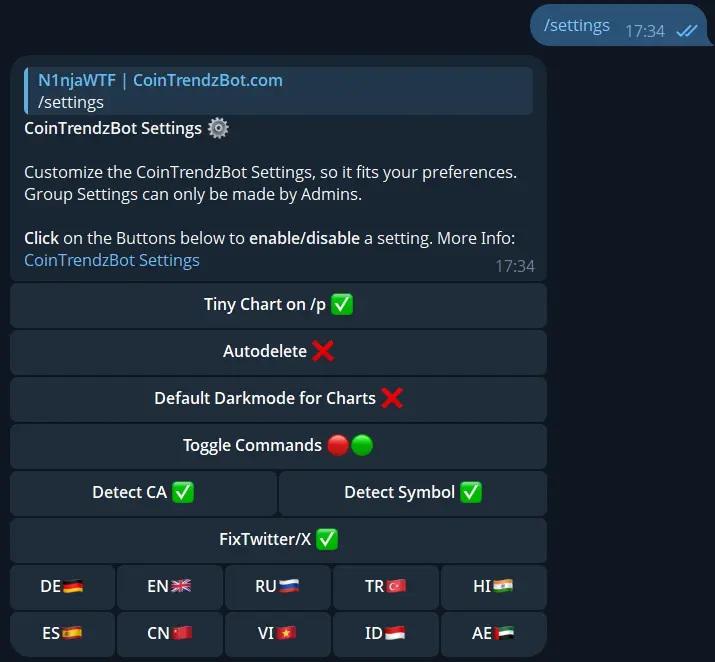
CoinTrendzBot Settings on Telegram Explained
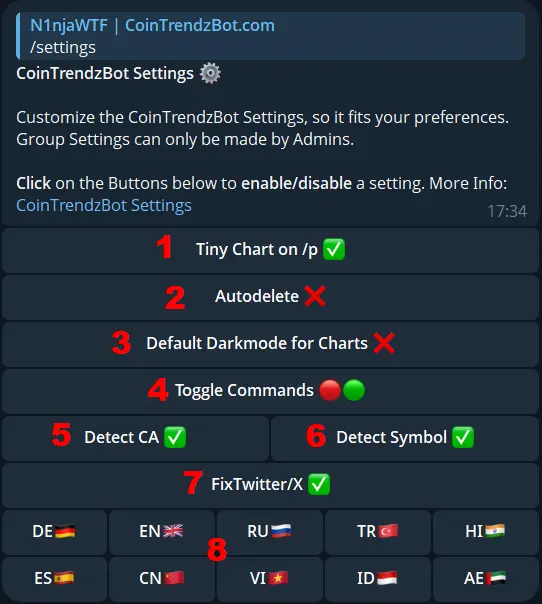
Type /settings in your Telegram Group or Chat to configure CoinTrendzBot. In Group Chats, only admins can configure settings and it affects the whole group. Here's a little overview, with all the Telegram Bot settings.
1. Tiny Chart on /p
Display a small sparkline chart on the /p command to quickly see the most recent price action. The Sparkline Chart shows the prices of the last few days in a minimal line-chart.
2. Autodelete
When enabled, amy bot commands & messages from CoinTrendzBot will automatically delete after one minute to keep the group chat clean.
3. Default Darkmode for Charts
Sets the default theme of charts to dark mode, which is easier on the eyes. The Chart themes for /c, /dc and /sc commands are affected.
4. Toggle Commands
Enable or disable specific bot commands for your group. When a command is disabled, CoinTrendzBot will no longer respond to it in the chat. This allows admins to customize which features are available and keep the group focused on what matters.
5. Detect CA
Enable it and CoinTrendzBot will automatically detect any Contract Adress sent in the Group Chat and reply with the latest price information. The Price information is the same as if you use the /d command manually.
6. Detect Symbol
Detect any messages in the Group Chat containing a Symbol Cashtag like '$btc' and automatically reply with the latest Price Information from Coingecko.
7. Fix Twitter / X
Enable it and CoinTrendzBot will automatically detect any Twitter / X.com links sent in the Group Chat and reply instantly with the tweet text plus key tweet stats right in the chat. Disable it anytime if you do not want the bot to respond to Twitter / X links automatically.
8. Languages
Select your preferred language for the Bot. English is the standard and preferred language.
Start Customzing Your Crypto Bot Experience
Get Started with CoinTrendzBot!
Telegram Bot Setup Guide Chat with the Bot!Questions?
Join our Support Group below, if you have any open questions, feedback or suggestions!