 CoinTrendzBot
Telegram Bot Help Commands
View all available CoinTrendzBot commands, features, and usage instructions directly inside Telegram chats and groups.
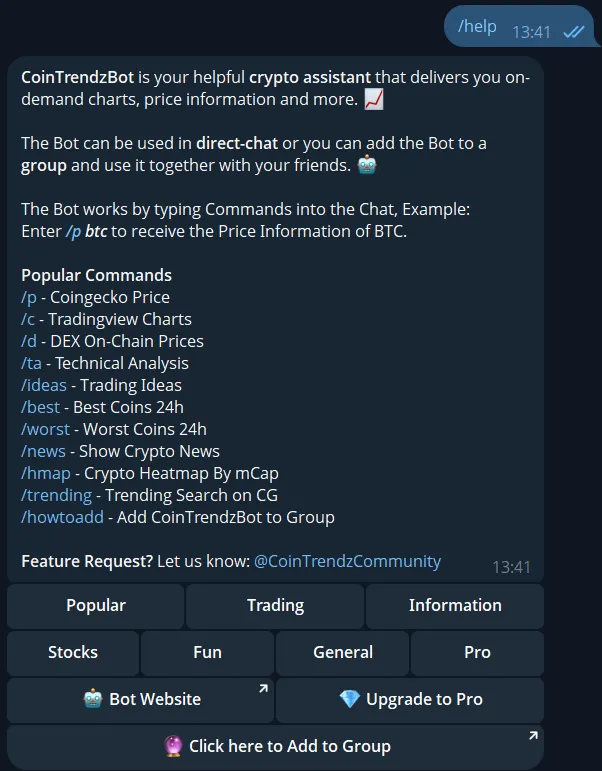
How to use the Help Command on Telegram
The /help command gives you a complete overview of all available CoinTrendzBot commands. It’s the fastest way to discover features, understand how each command works, and start using the bot efficiently without leaving Telegram.
View all commands
Instantly see a full list of supported commands and features in one place.
Learn usage quickly
Understand how each command works without needing external documentation.
Works in groups
Use the help command in Telegram groups or private chats anytime.
Fast onboarding
Perfect for new users who want to get started with CoinTrendzBot instantly.
Telegram command syntax
Use the command below inside Telegram to view all available bot commands and features.
How to use /help command on Telegram
Start exploring all CoinTrendzBot features in seconds.
Start the bot
Open CoinTrendzBot on Telegram and begin a private chat.
Run the help command
Type /help to display the full list of commands and features.
Explore features
Pick any command from the list and start using it instantly.
Perfect for Telegram groups
The /help command is especially useful in groups where new members need quick guidance on how to use CoinTrendzBot without asking repeatedly.
- New members can instantly learn available commands
- Reduces repetitive questions in group chats
- Helps communities onboard users faster
- Encourages exploration of all bot features
- Makes group interactions smoother and more efficient
Use the help command for free
Access all CoinTrendzBot commands and features directly in Telegram at no cost.
Need help or want to connect with other users?
Join the CoinTrendz community
Join our Telegram community group if you have questions or want to learn how others use CoinTrendzBot.

Using a different platform?
See the other versions of this feature
Frequently asked questions
Explore more CoinTrendzBot Commands