 CoinTrendzBot
Discord DEX Trending Pools Bot
Bring trending on-chain pools, volume, liquidity, price change, and transaction activity directly into your Discord server.
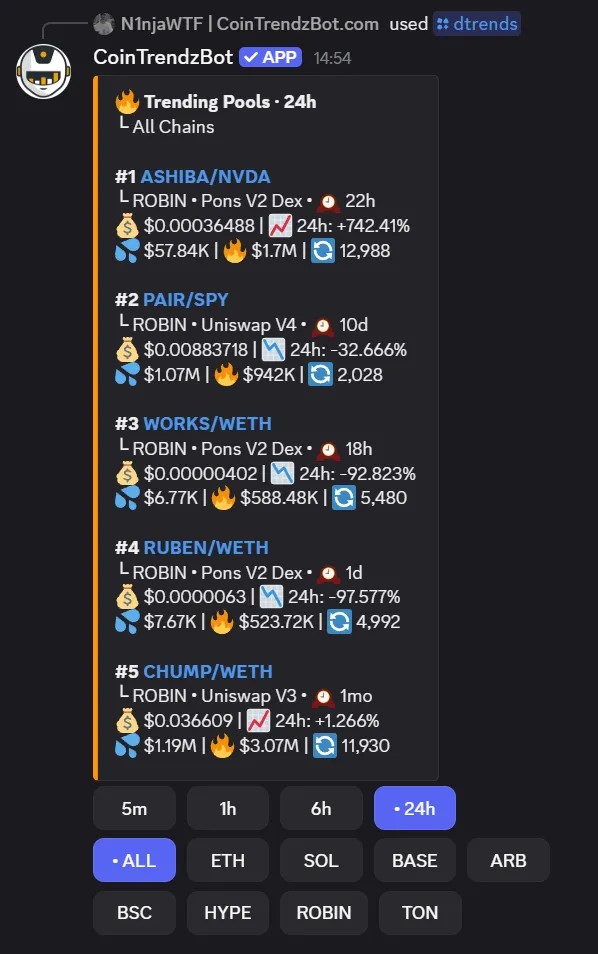
How DEX Trending Pools works on Discord
Choose all chains or a supported blockchain, select a trending timeframe, and CoinTrendzBot returns the leading DEX pools with the market data needed for a fast comparison.
Search multiple chains
Review pools across Ethereum, Solana, Base, Arbitrum, BNB Chain, HyperEVM, Robinhood Chain, and TON.
Change the timeframe
Switch between 5m, 1h, 6h, and 24h activity to separate short-term momentum from broader trends.
Compare market quality
See liquidity, volume, transactions, price, and price change before opening a pool.
Continue into token research
Open the token through CoinTrendzBot to inspect its DEX price, chart, holders, and security data.
Discord command syntax
Filter trending pools by blockchain and timeframe, or run the command without options for the 24-hour all-chain view.
/dtrends [blockchain] [timeframe]
How to use DEX Trending Pools on Discord
Get the result directly in chat in a few simple steps.
Open CoinTrendzBot
Open the bot or add it to the chat where you want the result.
Run the command
Enter /dtrends and submit the command.
Review the result
Compare the ranked pools and open the most relevant token for deeper DEX research.
Faster on-chain discovery for crypto communities
Give members a compact view of the DEX pools attracting the most attention right now.
- Multi-chain DEX discovery
- 5m, 1h, 6h, and 24h filters
- Price, liquidity, volume, and transactions
- Direct links to detailed token data
- Works in Telegram and Discord
Use this command for free
The /dtrends command is available for free on Telegram and Discord.
Need help or want to meet other traders?
Join the CoinTrendz community
Discuss crypto markets, bot commands, and new CoinTrendzBot features with other users.

Looking for another version?
Explore more ways to use this feature
Frequently asked questions
Explore more CoinTrendzBot commands