 CoinTrendzBot
Discord Crypto Orderbook Analysis Bot
Analyze bid and ask depth for a crypto market and share current orderbook pressure with your Discord server.
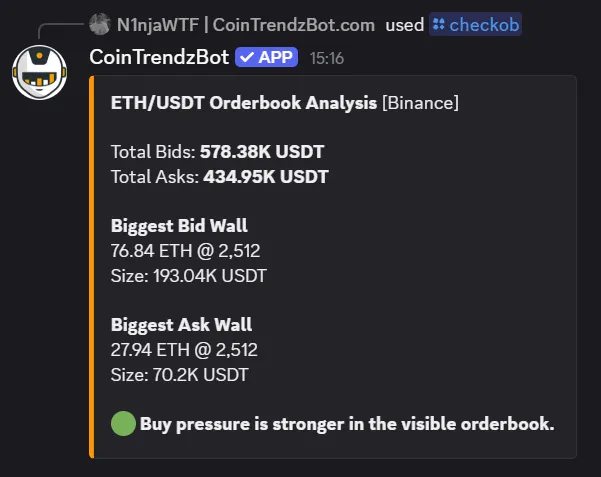
How Crypto Orderbook Analysis works on Discord
Enter a ticker or trading pair and optionally an exchange. CoinTrendzBot resolves a supported market, loads current orderbook levels, and compares available bid and ask liquidity.
Resolve the market
Enter a ticker, pair, or exchange preference to select the intended spot orderbook.
Load market depth
CoinTrendzBot retrieves current bids and asks from the selected exchange.
Compare both sides
Review buy-side and sell-side liquidity to understand the current imbalance.
Share a compact result
Post the orderbook summary directly in a Discord trading channel.
Discord command syntax
Enter a ticker or trading pair and optionally include a supported exchange.
/checkob parameters:<ticker|pair> [exchange]
How to use Crypto Orderbook Analysis on Discord
Get the result directly in chat in a few simple steps.
Activate CoinTrendz Pro
Make sure your account or server has active Pro access.
Run the command
Enter /checkob parameters:BTC and submit the command.
Review the result
Compare bid and ask depth and use the pressure summary as short-term market context.
Readable orderbook context for Discord traders
Turn raw bid and ask levels into a compact pressure summary that a trading community can discuss.
- Bid versus ask depth
- Buy and sell pressure
- Automatic market resolution
- Optional exchange selection
- Compact Discord analysis
Unlock Crypto Orderbook Analysis with CoinTrendz Pro
The /checkob orderbook analysis command is available with CoinTrendz Pro.
Need help or want to meet other traders?
Join the CoinTrendz community
Discuss crypto markets, bot commands, and new CoinTrendzBot features with other users.

Looking for another version?
Explore more ways to use this feature
Frequently asked questions
Explore more CoinTrendzBot commands