 CoinTrendzBot
Discord Crypto Market Index Bot
See the top cryptocurrencies by market cap, compare price moves, and keep an eye on leading digital assets right inside Discord servers and direct messages.
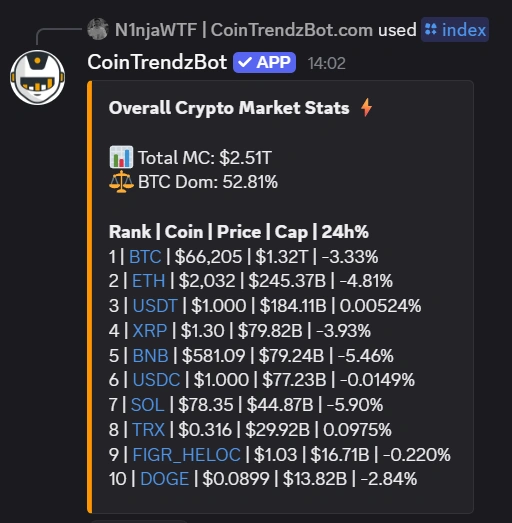
How to get the Crypto Market Index on Discord
The /index command gives your Discord server an instant market overview without breaking the flow of conversation. In one bot response, members can review top coins by market cap, compare price action, and follow the broader crypto leaderboard from the same channel where the discussion is already happening.
Market cap leaderboard
Pull up the leading cryptocurrencies ranked by market capitalization in a single Discord reply.
Quick performance view
Compare price performance across major coins and spot how the top of the market is moving.
Designed for shared chats
Use the command in a server channel or DM and let everyone react to the market leaders together.
Simple slash command
Run /index and get the crypto market overview back in seconds.
Discord command syntax
Use the command below in Discord to view the crypto market index and the highest-ranked cryptocurrencies.
How to use /index command on Discord
Get your server set up with a live crypto market view in only a few quick steps.
Add the bot
Open CoinTrendzBot on Discord and add it to your server or start a direct message with the bot.
Invite it to your server
Install CoinTrendzBot in your Discord server so your community can follow the top coins together.
Run the command
Type /index to instantly see the top cryptocurrencies ranked by market cap.
Perfect for Discord servers
CoinTrendzBot fits naturally into Discord communities where members watch the biggest cryptocurrencies, compare rankings, and respond to changing market conditions together without leaving the chat.
- Everyone in the server can check the top cryptocurrencies instantly with one command
- Useful for trading servers, market watchers, and crypto-focused communities
- Makes live discussion around market leaders more interactive inside channels
- Cuts down on repeatedly sharing outside links and screenshots
- Helps members compare major coins and their positions side by side
Use this Discord crypto market index bot for free
Check top cryptocurrencies and market rankings directly inside Discord without a paid upgrade.
Need help or want to connect with other users?
Join the CoinTrendz community
Join our Discord community if you want support, feedback, or a place to connect with other CoinTrendzBot users and crypto traders.

Using a different platform?
See the other versions of this feature
Frequently asked questions
Explore more CoinTrendzBot commands