 CoinTrendzBot
Discord Crypto Funding Rates Bot
Check live crypto funding rates directly in your Discord channels so your community can spot market bias, crowded trades, and perp sentiment faster.
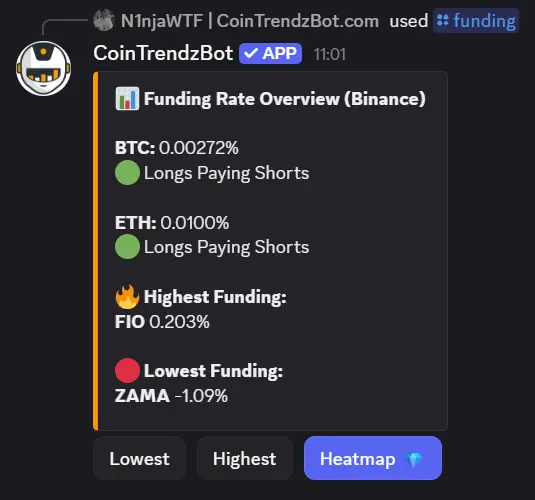
How to check Crypto Funding Rates on Discord
Use the /funding command inside any Discord channel to instantly pull crypto perpetual funding data into chat. The bot replies directly in the conversation so members can review funding bias, compare sentiment, and react to overheated positioning together.
Pull funding data in chat
Type a simple slash command and the bot posts crypto funding rate data straight into your Discord channel.
Spot market bias quickly
See whether longs or shorts are paying so your server can read perpetual market sentiment faster.
Built for community trading servers
Share funding rate checks in active channels so members can discuss setups, risk, and positioning together.
Stay inside Discord
Check perp funding conditions without switching between exchange tabs, dashboards, and external tools.
Discord command syntax
Enter the command below in any server channel to instantly display crypto funding rate data.
/funding <symbol>
How to use /funding command on Discord
Set up your Discord server for fast crypto funding rate checks in just a few steps.
Invite the bot
Add CoinTrendzBot to your Discord server so it can respond to slash commands in your channels.
Choose a channel
Pick a text channel where traders, members, or moderators want to review funding rates together.
Run the command
Type something like /funding btc and the bot will instantly return the current funding rate details in chat.
Perfect for Discord trading communities
Bring perpetual funding rate analysis into your Discord server and help members monitor sentiment, identify crowded positioning, and discuss market conditions in real time.
- Check funding rates instantly during market discussions
- Great for trading groups and crypto Discord servers
- Helps members read long vs short positioning faster
- Keeps sentiment analysis inside Discord channels
- Encourages replies, reactions, and shared market insights
Use this Discord crypto funding rates bot for free
Check live crypto funding rates inside your Discord server at no cost and help your community monitor perpetual market sentiment with fast in-chat data.
Need help or want to connect with other users?
Join the CoinTrendz community
Join our Discord community to discuss funding rates, compare setups, share market views, and see how other servers use the bot during live trading conversations.

Using a different platform?
See the other versions of this feature
Frequently asked questions
Explore more CoinTrendzBot Commands