 CoinTrendzBot
Discord Bot Help Commands
See every available CoinTrendzBot command, feature, and usage tip directly inside Discord channels and direct messages.
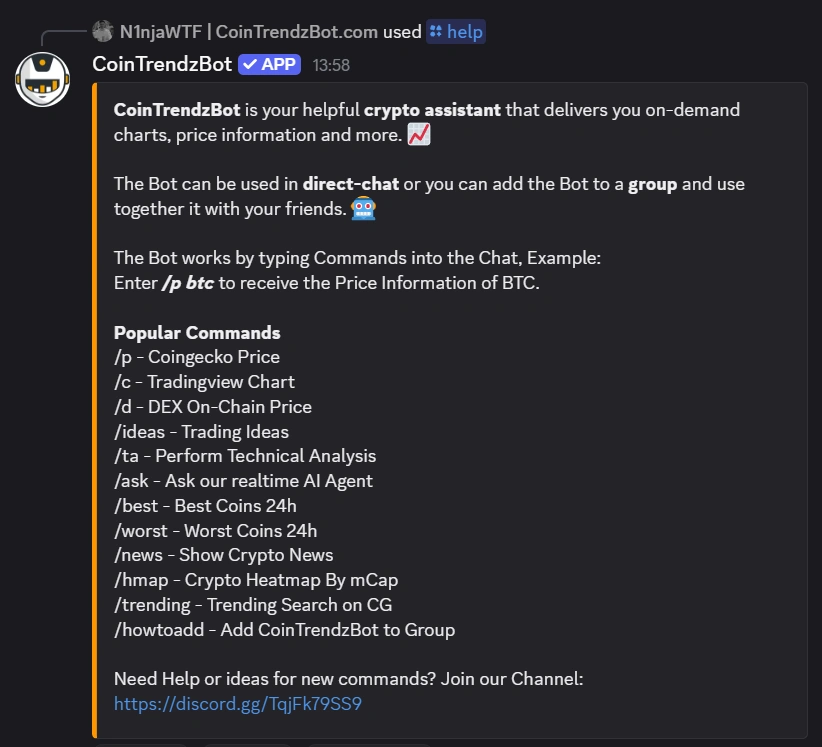
How to use the help command in Discord
Run /help to pull up a full CoinTrendzBot command list inside Discord. It is the quickest way to see what the bot can do, understand how to use each feature, and get started without hunting through outside guides.
See every command
Open a full list of supported CoinTrendzBot commands and features directly in your Discord chat.
Understand usage fast
Get command guidance in-channel so users can learn the bot without needing separate documentation.
Available in servers
Use the help command in server channels or direct messages whenever someone needs a quick walkthrough.
Smooth onboarding
A simple way for first-time users to discover features and start using CoinTrendzBot right away.
Discord command syntax
Use the command below in Discord to display the available bot commands and features.
How to use /help command on Discord
Start browsing CoinTrendzBot features in just a moment.
Add the bot
Add CoinTrendzBot to Discord, then open a server channel or direct message where you want to use it.
Run the help command
Type /help to show the complete command list and feature overview right in chat.
Explore features
Pick any command from the help response and start using it immediately in Discord.
Especially useful for Discord communities
The /help command works well in busy servers where new members need quick direction on using CoinTrendzBot without repeating the same setup or feature questions in chat.
- New members can instantly see what commands are available
- Cuts down on repeated questions across server channels
- Makes community onboarding faster and easier
- Encourages members to explore more bot features
- Helps server conversations stay organized and efficient
Use the Discord help command for free
Check available CoinTrendzBot commands and features directly in Discord without paying anything.
Need help or want to connect with other users?
Join the CoinTrendz community
Join our Discord community to ask questions and see how other members use CoinTrendzBot in their servers.

Using a different platform?
See the other versions of this feature
Frequently asked questions
Explore more CoinTrendzBot Commands